Researched buying guide. We have not tested the products or product types described here. Last reviewed: 15 November 2026.
A dash cam is only useful if it records clear footage, stays powered when you need it, and does not cause legal or privacy problems. The short answer: decide how you will use it first, then check video quality, power and storage, and read the Indian points below on view, evidence and privacy before you install it.
Who this guide is for
- Drivers who want evidence in case of an accident or dispute.
- People who want parking protection.
- Anyone unsure whether they need front-only, front-and-rear or an interior camera.
What to look for
Video quality: resolution is not the whole story
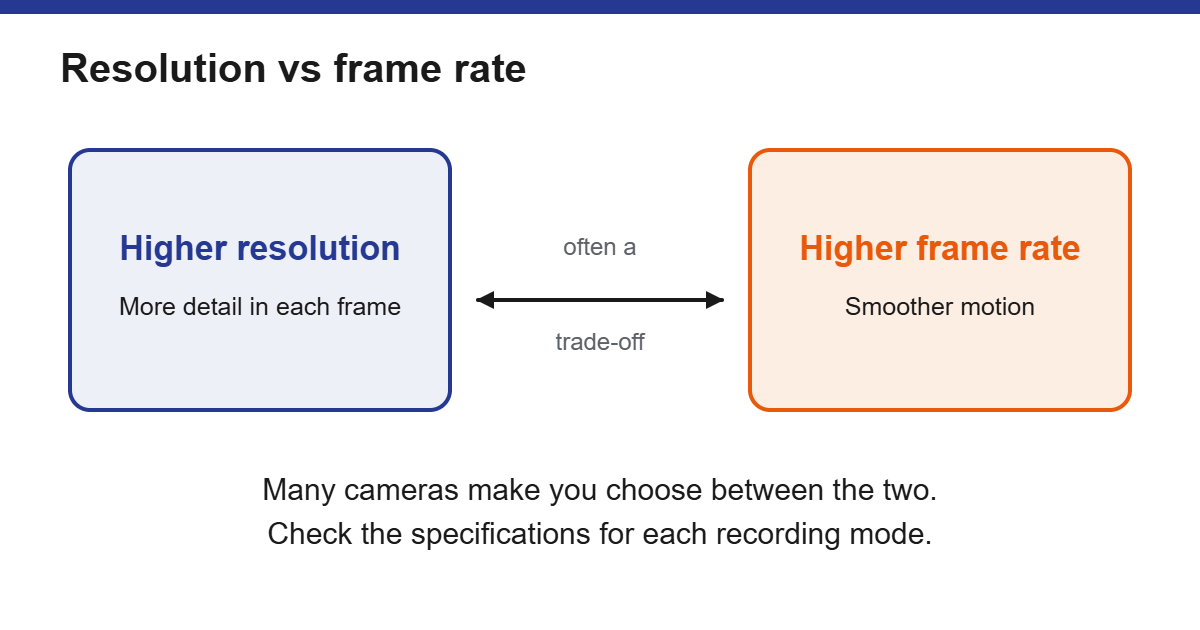
Higher resolution can capture more detail, but many cameras make you choose between the highest resolution and a higher frame rate. Check the spec sheet for the frame rate at each resolution. Low-light performance is also hard to judge from a spec sheet, so look at sample night footage from independent sources rather than relying on a number.
Field of view
A wider lens captures more of the scene but can distort the edges and reduce detail. One maker suggests a field of view of roughly 120 to 140 degrees as a balance. Treat that as a starting point, not a rule.
One, two or three channels
A front camera covers the most common incidents. A rear camera adds coverage for rear-end collisions. An interior camera is mainly useful for taxi or ride-hailing work. If you are unsure, some systems let you add a camera later.
Power and parking mode
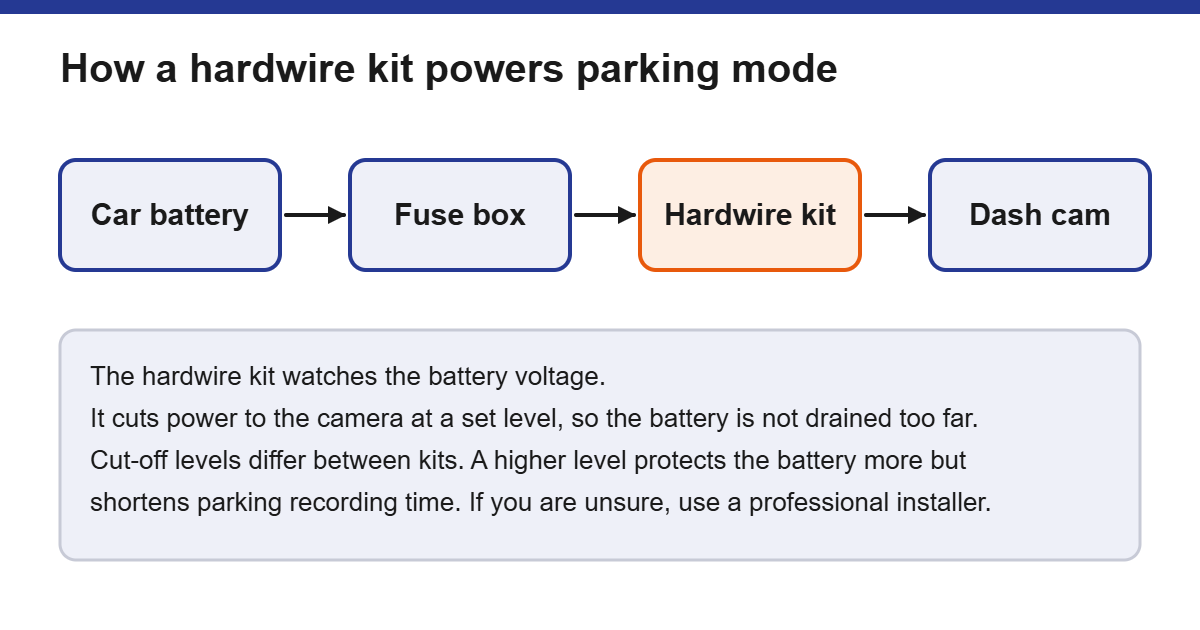
Plugging into a lighter socket usually powers the camera only while the car is on. Parking mode normally needs a hardwire kit, which watches the car battery and cuts power to the camera when the voltage falls to a set level, so it does not drain the battery too far. Cut-off levels differ between kits, and a higher cut-off protects the battery more but shortens parking recording time. Runtime estimates from sellers vary a lot, so we do not give hours here. A hardwire install involves your car’s fuse box. If you are not confident, use a professional.
Storage
Dash cams record in a loop, overwriting old footage, and most can lock important clips. Check the maximum memory card size the camera supports, and check the maker’s advice on which card type to use for constant recording.
Extras: Wi-Fi, GPS, cloud
Wi-Fi and an app make it easier to copy clips. GPS adds location and speed to footage. Cloud features may involve a subscription and mean your footage is stored on someone else’s servers, so read the privacy terms.
Legal and privacy checks in India
- Is it legal to fit one? The legal commentary we read says dash cams are not prohibited in India, and we could not find an official rule that bans them or fixes where they must sit. Treat it as a device on your windscreen and keep it out of your view.
- Using footage as evidence. The Bharatiya Sakshya Adhiniyam, 2023 replaced the Indian Evidence Act on 1 July 2024. Section 63 deals with electronic records such as video, and commentary on it says the footage must come with a certificate in the prescribed form. Keep the original card or file, lock the clip straight after an incident, and ask the police or a lawyer how to present it. A dash cam does not guarantee that footage will be accepted.
- Privacy. Footage can show other people, and audio can capture conversations. Think before you record audio in the cabin, tell your passengers, and avoid posting footage online that shows identifiable people or number plates.
- Taxi and ride-hailing. If you drive for a living, also check your licence and platform conditions before fitting an interior camera.
Which setup suits you?
| Your situation | Worth considering | Notes |
|---|---|---|
| Daily commuter | Front camera, loop recording, good low-light performance | Plug-in power from a socket is often enough |
| Parks on the street | Parking mode with a hardwire kit and voltage cut-off | Consider a professional install |
| Taxi or ride-hailing | Front plus interior or rear camera | Check audio and passenger-notice rules, and any licence or platform conditions |
| Long road trips | Larger memory card, GPS logging | Check the camera’s operating temperature range |
| Hot climates | Check the maker’s heat rating | Some makers say capacitor-based cameras cope with heat better than battery-based ones |
Installing it properly
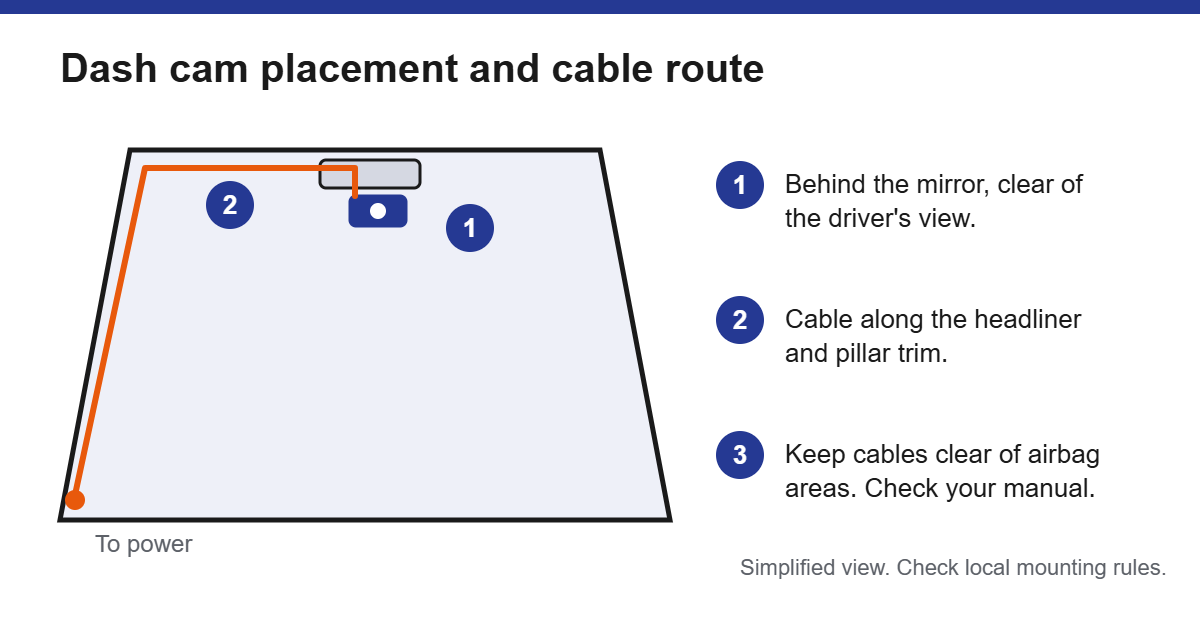
- Choose the spot. Common practice is behind the rear-view mirror, where it does not block your view. We could not find an official Indian rule on dash cam placement, so keep it clear of the area you need to see through and the wiper sweep, and away from airbag zones and sensors.
- Clean and dry the glass before you stick or press the mount on.
- Route the cable neatly along the headliner and trim rather than across the windscreen. Keep cables clear of airbag areas, and check your owner’s manual if unsure.
- Set up the camera: date and time, and format the memory card in the camera.
- Test it. Record a short clip, play it back, and check the picture is level, sharp and, if you rely on audio, that the microphone setting is what you want.
If your car is a larger vehicle with a different electrical system, check the camera’s accepted input voltage before you connect it.
Looking after it
- Play back a clip every so often to confirm it is recording properly.
- Reformat the card when the maker recommends, and replace it if it starts giving errors.
- Update the firmware according to the maker’s instructions.
- After an incident, lock or copy the clip promptly so it is not overwritten.
What a dash cam cannot do
A dash cam records what its lens sees. It does not guarantee that footage will settle a dispute, it cannot see everything around the car, and picture quality varies a lot with light and weather. Treat it as one source of evidence, not a guarantee.
Dash cams in Indian conditions
- Heat. A car parked in strong sun can get very hot inside. Check the camera’s operating temperature range, and see the heat note in the table above.
- Memory cards. A dash cam writes constantly, so use a card type the maker recommends, and buy it from an authorised seller so you get a genuine card.
- Warranty and support. Buy from a seller that gives an Indian warranty and a way to get support, since parking-mode wiring and firmware questions are common.
Mistakes to avoid
- Buying on resolution alone.
- Placing the camera where it blocks your view.
- Expecting parking mode to work from a lighter socket.
- Forgetting to check the memory card now and then.
- Sharing footage that shows other people without thinking about privacy.
Who may not need one
- Drivers who only make very short, rare trips and do not want to manage another device.
- Anyone uncomfortable with the legal or privacy responsibilities where they live.
Checklist before you buy
- Decide front-only or front-and-rear.
- Decide whether you need parking mode, and if so, plan the hardwire install.
- Check the supported memory card size.
- Read the Indian points on view, evidence and privacy.
- Check whether features you want need a subscription.
Frequently asked questions
Will a dash cam drain my car battery?
It can if it is wired to constant power without a cut-off. Makers describe voltage cut-off settings to prevent this. Follow your kit’s instructions.
Do I need 4K?
Not necessarily. Check frame rate, low-light performance and reliability as well.
How much storage do I need?
It depends on resolution and bitrate. Higher-resolution recording generally uses more space per hour, and makers usually publish estimates of recording time for each card size. Check the camera’s specifications.
Do I need a rear camera?
Not necessarily. A front camera covers the most common situations. A rear camera adds coverage for rear-end collisions and is worth thinking about if you often drive in heavy traffic.
Will it work in very hot or cold weather?
Check the operating temperature range in the specifications. Cars parked in strong sun can get very hot inside, and some cameras handle this better than others.
Conclusion
Match the camera to how you drive and park, plan the power supply, and check the Indian points on view, evidence and privacy before installing. When we add specific recommendations, they will be clearly labelled.
Related guides
- Browse more in Car Electronics.
Sources
- Nextbase support: Will my dash cam drain my car battery? (a maker’s explanation of parking mode and voltage cut-off).
- Legal commentary on dash cams in India: Are Dashcams Legal in India? (a law-firm style article, not official guidance).
- Commentary on electronic evidence under the Bharatiya Sakshya Adhiniyam, 2023, Section 63: TaxGuru. This is secondary commentary, so check the official text on the India Code portal and ask a lawyer about your case.